LPC Pro packs over 30 chat features into a single jar: it covers your chat formatter, moderation tools, and social plugins at once, so one plugin and one config replace a stack of separate chat plugins.
Messages appear instantly while AI analyzes in the background
🎨
MiniMessage Chat Formatting
Full MiniMessage with gradients, rainbow, and hex colors
🔗
Discord Integration
Real-time Minecraft ↔ Discord message sync
💬
Chat Bubbles
No resource pack required
🎲
Chat Games
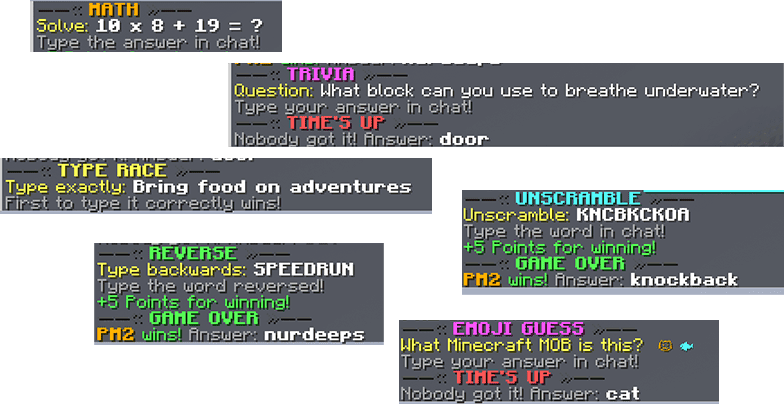
Math, Unscramble, Trivia, Reverse, Type Race, Emoji Guess
🏆
Achievements
Unlock achievements as you chat more
🔧
Staff Tools
Mute players, channels, or entire server chat
🛍️
Chat Shop
Colors, tags, nicknames, and more — all through a GUI shop
From The Developer
A premium chat plugin built for servers that take their chat seriously. LPC Pro replaces EssentialsChat, ChatManager, and VentureChat with a single, high-performance jar.
What's inside:
AI-powered moderation that catches what keyword filters miss
Full MiniMessage support with gradients, hover, and click actions
Native Discord integration — no DiscordSRV required
Chat bubbles that render above players without resource packs
6 chat games including Math, Trivia, and Unscramble
[ Download latest: v2.1.5 ]
◆
AI-Powered Moderation
Protect your community with intelligent moderation that goes beyond simple keyword matching. Our AI filter analyzes messages asynchronously, catching toxic behavior, harassment, and harmful content that traditional filters miss — without adding any delay to chat.
Zero Latency — Messages appear instantly while AI analyzes in the background
Auto-Removal — Toxic messages are automatically deleted after detection
Smart Enforcement — Automatic warnings, reputation penalties, and staff alerts
Self-Learning Filter — AI teaches your local swear filter new words over time
Staff Notifications — Moderators receive real-time alerts when toxic content is detected
Fully Configurable — Adjust thresholds, penalties, and learning behavior
Detailed Logging — View toxicity scores, categories, and flagged content
Cost Conscious — Rate limiting and response caching to manage API costs
Requires OpenAI API key.
◆
Chat Formatting
Transform every message into a work of art. LPC Pro leverages the full power of MiniMessage to deliver rich, interactive chat experiences with gradients, hover tooltips, click actions, and per-group styling.
Native MiniMessage Support — Full gradient, rainbow, and hex color support
Per-Group Formatting — Unique chat styles for every rank
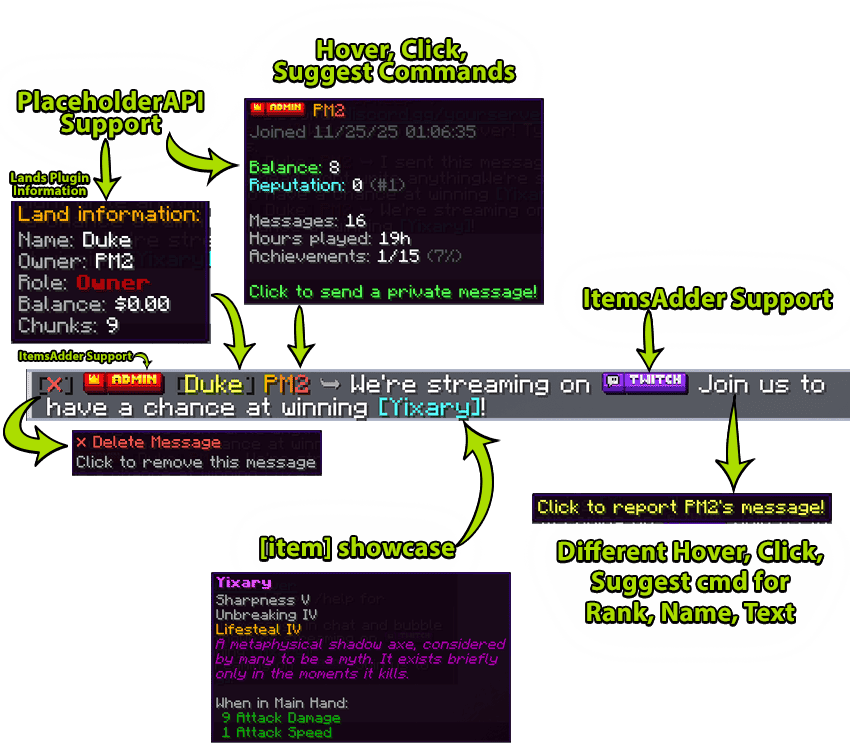
Interactive Elements — Hover tooltips showing player info, click-to-execute commands
ItemsAdder Integration — Custom emojis and font images for ranks and chat
PlaceholderAPI Support — Display any placeholder in chat formats
Item Showcase — Players show their held item in chat with full NBT tooltip on hover
Delete Button — Staff can remove individual messages with a single click
◆
Discord Integration
Connect your Minecraft chat with Discord seamlessly. Messages flow both ways with full formatting support, embedded player info, and customizable webhooks.
Bi-Directional Sync — Minecraft ↔ Discord chat in real-time
DiscordSRV Support — Native integration with the popular bridge plugin
Webhook Support — Beautiful embedded messages with player heads
Join/Leave Notifications — Announce player activity to Discord
Advertisement Messages — Promote your Discord to players in-game
◆
Chat Bubbles
Bring your server to life with floating chat bubbles that appear above players when they speak. Perfect for roleplay servers, survival communities, or anywhere immersion matters.
No Resource Pack Required — Uses native TextDisplay entities (1.19.4+)
Per-Rank Styling — Custom colors, backgrounds, and scales for each group
Highly Configurable — Duration, line count, scale, background opacity
Performance Optimized — Automatic cleanup, minimal server overhead
Player Toggle — Players can disable bubbles with /toggle bubbles
◆
Chat Games
Keep your community entertained with six unique chat games. Track statistics, display leaderboards, and let players compete for rewards. Six games: Math, Unscramble, Trivia, Reverse, Type Race, Emoji Guess.
Auto-Scheduling — Games start automatically at configured intervals
Custom Rewards — Execute any command when players win
Statistics & Leaderboards — Track wins, games played, and win rates
Custom Word Lists — Add your own words for unscramble challenges
◆
Achievements
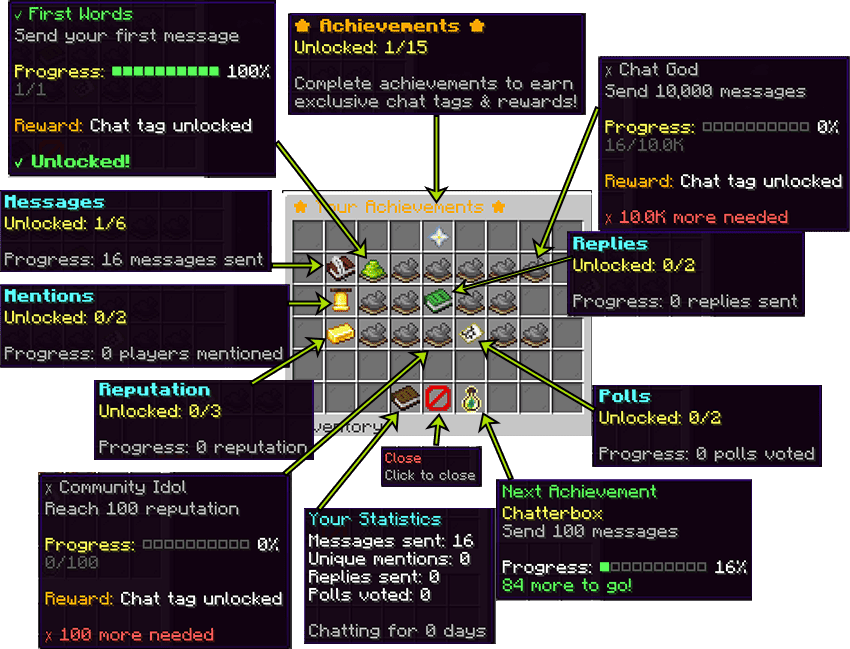
Reward player engagement with a comprehensive achievement system. Players unlock achievements by chatting, mentioning others, voting in polls, and building reputation — each unlocking exclusive chat tags.
Message Milestones — Unlock achievements as you chat more
Social Achievements — Rewards for mentioning and interacting with others
Reputation Achievements — Earn titles as your reputation grows
Custom Rewards — Execute commands when achievements unlock
Progress Tracking — Players can view progress in the achievements GUI
◆
Staff Tools
Give your moderation team everything they need. From muting troublemakers to tracking repeat offenders, LPC Pro provides a complete staff toolkit that works together seamlessly.
Mute System — Mute players, channels, or entire server chat
Warnings — Auto-escalation with staff notes
Staff Notes — Private notes with alerts on join
Report System — Players report, staff review in GUI
Click-to-Delete — Delete any message with a click
Raid Protection — Auto-detect and block raid attempts
Word Filter — Local filter with bypass and evasion detection
Anti-Spam, Anti-Caps, Anti-Ads — Built-in checks that work without the AI key
Chat History Search — Search through past chat messages
◆
Chat Shop
Let players purchase chat perks with in-game currency or points. Colors, tags, nicknames, and more — all through a clean GUI shop interface with dual-currency support.
Dual Currency Support — Use Vault economy or the built-in points system — your choice
Fully Configurable Items — Define your own shop items, prices, and rewards
Permission Grants — Automatically give permissions on purchase — no manual admin step
Category Browsing — Organized tabs for colors, tags, names, and perks
◆
And More — Built Into the Same Jar
Beyond the headline systems, LPC Pro bundles the everyday chat tools most servers otherwise reach for a second or third plugin to cover.
Chat Channels — Unlimited channels with quick-prefix messaging
Private Messaging — /msg and /r with custom formats and staff spy
Mail System — Send messages to offline players
Built-in Emojis — Smileys, gaming and Minecraft themed — type :emoji:
Polls — Server polls with live voting and results
Reputation System — +rep with leaderboards and achievements
Nicknames — Custom display names with color support
Announcements — Scheduled broadcasts with conditions
Antibot Protection — Block bot attacks with join rate limits
Do Not Disturb — DND mode with a custom auto-reply message
Custom Commands — Create your own commands in YAML config
Proxy Support — BungeeCord & Velocity cross-server sync
Grammar Correction — Auto-capitalize and punctuate messages
Newcomer System — Special handling for new players
Staff Macros — Quick-send preset messages with /macro
Ignore System — Block messages from specific players
Sound Notifications — Configurable sounds for mentions and events
Chat Color GUI — Players pick their chat color from a GUI
Chat Tags — A tag system, with tags unlocked by achievements
Quick Replies — Reply to the last message without retyping the name
Fully Translatable — All messages customizable via config files
◆
Integrations
LPC Pro syncs with LuckPerms and hooks into the plugins you already run: LuckPerms, Vault, PlaceholderAPI, ViaVersion, DiscordSRV, ItemsAdder, Oraxen, Geyser, BungeeCord, Velocity and Essentials.
LuckPerms — Automatic sync — per-rank chat styles follow your permission groups
Vault & PlaceholderAPI — Economy for the Chat Shop, and placeholders throughout your chat formats
One-time purchase · 7-day money-back guarantee · EU tax included
Customer Reviews (0)
How reviews work
Anyone with an account can review; reviews from accounts (or emailed invite links) tied to a paid order get the "Verified purchase" badge automatically — we never add the badge by hand. Every review is checked before publication, but only for spam, abuse, or personal data: we publish negative reviews and do not reward, edit, or reorder reviews based on rating. One review per person per plugin. Reviews marked "Posted on SpigotMC" or "Posted on BuiltByBit" were written by buyers on those marketplaces and copied here by us with a link to the original; they never get the badge and are not counted in the rating.
Used this plugin? Sign in to leave a review. Verified-purchase reviews get a badge.