G+
Utilities & Tools
Utilities & Tools

GUIPlus

v2.1.3Updated Mar 14, 2026

Complete GUI editing suite. In-game editor, animations, conditions, events — no YAML required.

Compatible Minecraft Versions
Works on 1.1626.2(11 versions)
#1
In-game menu editor
#1
10 condition types
#1
12 click event types

In-Game Menu Editor

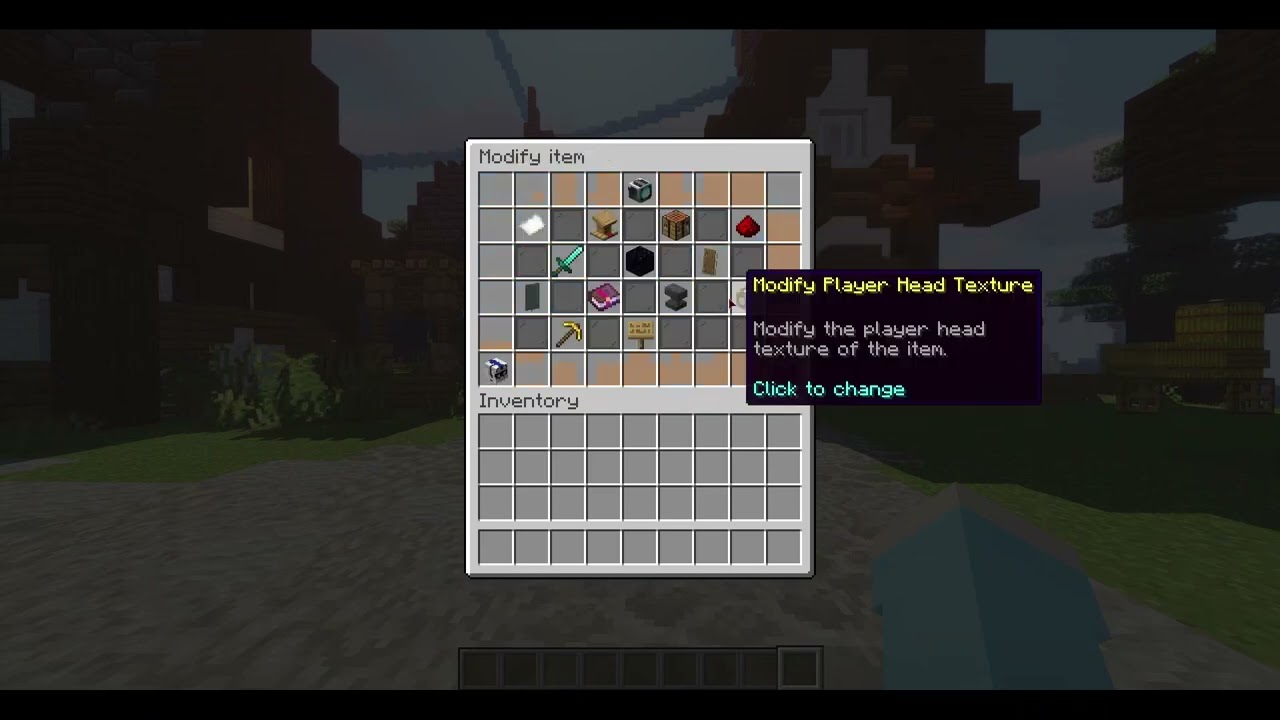
The system menus handle the heavy lifting: click an item and configure it. Items, conditions, click events, scenes, chat fetchers and economy actions are all set from GUIs, and menus you already have can be converted instead of rebuilt.
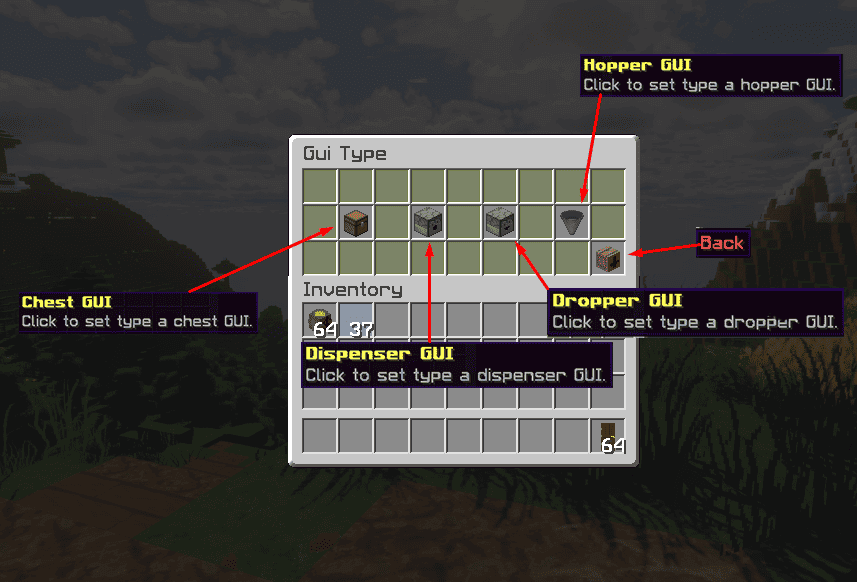
  • Click-to-ConfigureEvery menu and item is edited through system menus rather than a text file
  • Item EditorName, lore, conditions and click events per item, all from the editor
  • Item ClonerQuickly add new items by cloning an existing one
  • DeluxeMenus ConverterDrop your DeluxeMenus and custom GUI folders into plugins/GUIPlus and the converter takes care of your menus
In-game editor configuring a menu item

Animated Lores

Create any animation for item lores with ease. Lore frames are written in the in-game lores editor, and the plugin cycles them on the item for you.

  • Any Lore AnimationCycle any sequence of lore lines on a menu item
  • In-Game Lores EditorFrames are written in the same editor as everything else
  • Configured, Not CodedNo programming involved

Animation Scenes

Scenes let you create any animation you wish for a menu, from a shop reveal to a bank transaction. Scenes can open conditionally — show scene A, check the conditions, then show scene B — and link up with other plugins through events.

  • Scene EditorCreate a scene from scratch or edit an existing one in-game
  • Conditional OpeningChain scenes on level, money, empty-slot or any other condition
  • Event-LinkedTie scenes to click events so other plugins can be part of the sequence

Conditions

A conditions system that gates any item or scene, made to pair with click events and the chat fetcher. Each condition-able element carries its own fail message for when a check does not pass.
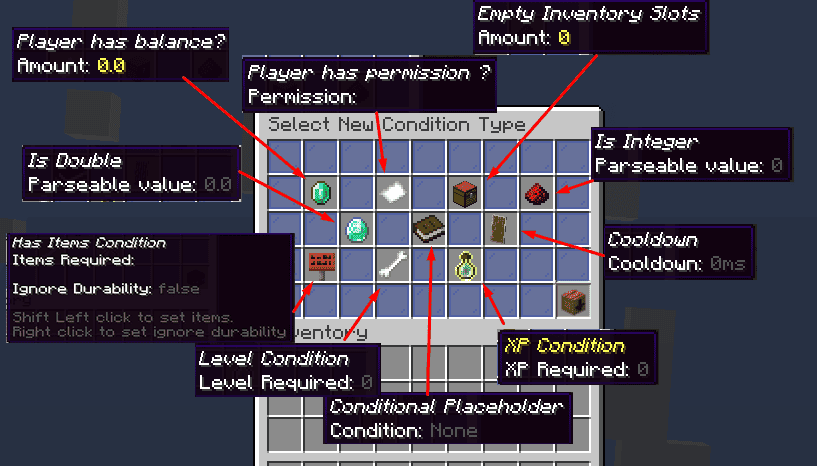
  • Player ChecksHas permission, has items (optionally ignoring durability), level, XP amount
  • Economy & InventoryPlayer has balance, empty inventory slots
  • CooldownIs not on cooldown, with the cooldown length set in the editor
  • Value & PlaceholderIs integer, is double, and a conditional placeholder check
  • Condition Fail MessageChange the message shown when any condition fails
Setting a permission condition on a menu item in the GUIPlus editor

Click Events & Information Saving

Twelve click event types cover messages, commands, money and items, and chain with conditions and chat fetchers. Events can also save information per player — a bank balance, for example — and read it back later.

  • Messages & TitlesMessage the player, send a title, close the open inventory
  • CommandsRun a command for the player, or through the player picker and offline player picker
  • MoneyGive, set or remove money through your economy plugin
  • Items & InputGive a custom item, or open a chat fetcher
  • Save Information per PlayerStore fields such as a bank balance in myField:myValue format for later use

Player-Picker & Chat Fetcher

Make menus practical for players and staff alike. The player-picker runs a command against a chosen online or offline player; the chat fetcher takes free-form input in chat and can be paired with conditions and click events.

  • Player PickerPick an online player and run a command with them as the target
  • Offline Player PickerThe same, for players who are not online
  • Chat FetcherPrompt in chat, capture the answer, then run its click event if the conditions pass
  • Exit Message ToggleShow or hide the exit message per fetcher

Economy, Custom Items and Aliases

Use other plugins' economies with conditions like has-money and events like money-remove or money-give. NBT support means custom items from ItemsAdder, Oraxen, Nexo, AdvancedEnchantments and others work in menus, and any menu can be opened by its own command.

  • Economy Integrationhas-money conditions and money-give / money-remove events against your economy plugin
  • NBT & Popular Plugin SupportItemsAdder, Oraxen, Nexo, AdvancedEnchantments and many more
  • Command AliasesTurn /guiplus armorshop into /armorshop, or take over /bank or /shop from another plugin

GUIPlus documentation

The full manual is on this site — installation, configuration, commands and permissions, kept in step with the plugin’s own wiki.

Buying guides

€14.99
One-time purchase · 7-day money-back guarantee · EU tax included

Showcase

GUIPlus Tutorial #1 — Creating a basic menu
by InfinitePlugins
GUIPlus Tutorial #2 — Example menu explanation
by InfinitePlugins
GUIPlus Tutorial #3 — System Menu Editor
by InfinitePlugins

Customer Reviews (0)

How reviews work

Anyone with an account can review; reviews from accounts (or emailed invite links) tied to a paid order get the "Verified purchase" badge automatically — we never add the badge by hand. Every review is checked before publication, but only for spam, abuse, or personal data: we publish negative reviews and do not reward, edit, or reorder reviews based on rating. One review per person per plugin. Reviews marked "Posted on SpigotMC" or "Posted on BuiltByBit" were written by buyers on those marketplaces and copied here by us with a link to the original; they never get the badge and are not counted in the rating.

Used this plugin? Sign in to leave a review.
Verified-purchase reviews get a badge.
Sign in to review
No reviews yet. Be the first to leave one — verified buyers can review from the form above.

More in Utilities & Tools

Explore all 15 plugins

G+
GUIPlus
v2.1.3 · Updated Mar 14, 2026
€14.99
GUIPlus — Minecraft GUI Editor [MC 1.16-26.2] | InfinitePlugins